
What is an AI-native CRM?
An AI-native CRM is a CRM in which AI agents can do the work, not just help with it. Agents use the same tools as people, with their own permissions, and every change they make is recorded. A CRM with an AI add-on uses AI to help a person, with summaries, drafts and suggestions, while the person still does the work.
AI CRM vs. AI-native CRM: what is the difference?
Almost every CRM calls itself an AI CRM now, and the label covers very different things: a button that summarises a record, a lead score, an assistant that drafts emails. All of that is useful. It just doesn't tell you who does the work.
That question is the simplest way to see the difference. Think of two ways a new colleague could help you. In the first, they sit next to you, read your screen and tell you what to do, but they never touch the keyboard. In the second, they get their own login with defined rights. They do the work, everything they change is logged under their name, and you decide what they may do alone and what needs your OK.
A CRM with an AI add-on works like the first colleague. The AI reads records and writes text: summaries, drafts, suggestions. To change anything in the CRM, a person still clicks. An AI-native CRM works like the second. An agent can do what a person can do in the CRM, with the same tools, its own permissions and a record of every change.
| Term | What it means | Who does the work |
|---|---|---|
| AI CRM | Any CRM with AI features. A marketing label, not an architecture | It depends |
| CRM with an AI add-on | AI on top of a CRM built for people: summaries, drafts, suggestions, scores | You. The AI helps |
| AI-native CRM | Every capability is also a tool an agent can use, with its own rights and an audit trail | The agent. You decide |
To make this concrete, I'll use one ordinary task all the way through this guide. It's Monday, and a sales lead wants to close the deals that went quiet for 30 days and log why on each one. Twenty deals match.
Why are AI-native CRMs becoming important now?
Because the last ten years changed what AI in a CRM can do, step by step. Here is the Monday task in each phase:
| Phase | What the AI does | The Monday task |
|---|---|---|
| CRM as a database, from the 1990s | Nothing. The CRM stores what people type in | You filter for quiet deals, open each one, change the stage and type a reason. 20 times |
| Predictive AI, from 2016 | Scores and forecasts, for example in Salesforce Einstein [1] | A score shows which deals are at risk. You still edit all 20 |
| Generative AI, from 2023 | Summaries and drafts, for example in Einstein GPT [2] and HubSpot's ChatSpot [3] | The assistant summarises each deal and suggests a reason. You still edit all 20 |
| Agents with tools, from 2024 | Plans a task and carries it out with tools, for example Salesforce Agentforce [4] and any agent over MCP [5] | An agent proposes the 20 changes, you review once, and it applies them |
The last step is the one that matters. In the first three phases, the AI gets better at telling you what to do, but the work stays with you. In the fourth, the AI can do the work. Two things made that possible: models learned to use tools reliably, and since Anthropic released the Model Context Protocol in November 2024, there is an open standard for handing a model the tools of another system [5]. MCP moved to the Linux Foundation's new Agentic AI Foundation in December 2025 [6], and since April 2026 even HubSpot lets any MCP-compatible AI tool read from and write to its CRM [7].
Analysts expect this to spread fast. Gartner predicts that 40% of enterprise applications will include task-specific AI agents by the end of 2026, up from less than 5% in 2025 [8]. The same firm expects over 40% of agentic AI projects to be canceled by the end of 2027, because of costs, unclear value or weak risk controls, and warns of "agent washing": existing assistants and chatbots rebranded as agents without real agentic capabilities [9]. In sales, Salesforce's own survey of 4,050 sales professionals found that 54% of sellers have used agents, and 51% of sales leaders with AI say disconnected systems slow down their AI initiatives [10].
So the question for a CRM is no longer whether it has AI. It's whether an agent can actually do the work in it, safely. That's what AI-native means, and because every CRM now uses the label, the rest of this guide is about how to tell.
AI-native CRM vs. CRM with an AI add-on: how do they compare?
Here is the Monday task in both kinds of CRM, step by step.
CRM with an AI add-on
- YouYou ask the assistant which deals went quiet.
- AIIt lists 20 deals and can summarise each one.
- YouYou open every deal, read, decide, set the stage to Lost and type a reason. 20 times.
- YouThe history shows 20 edits by you. It doesn't show which reasons the AI suggested.
You do the work. The AI helps.20 deals edited by hand
AI-native CRM
- YouYou ask the agent to close the deals that went quiet and log why.
- AgentIt finds the 20 deals, reads each history and proposes a reason for every one.
- YouYou review the list once, fix two reasons and approve.
- AgentIt applies the changes. The history shows each one: done by the agent, approved by you.
The agent does the work. You decide.1 review
The AI on the left isn't worse. It may even run on the same model. What differs is what it's allowed to touch: it can read deals and write text, but it can't change a deal. So the twenty edits stay with a person, and the record history can't tell you which reasons came from the AI.
The same pattern holds for most of the work in a CRM:
| Question | CRM with an AI add-on | AI-native CRM |
|---|---|---|
| Who does the work? | You. The AI helps | The agent. You decide |
| What can the AI touch? | Text: summaries, drafts, suggestions, scores | Everything a person can: records, stages, lists, tasks, sequences |
| The Monday task | 20 deals edited by hand | 1 review, then the agent applies the changes |
| What the history shows | Your edits, with no trace of what the AI suggested | Every change with its source, person, agent or API, and who approved it |
| When a new feature ships | AI support comes later, if at all | People and agents get it at the same time |
| Outside agents like Claude | Often a separate, smaller API, or none | MCP server and API with the same tools as the interface |
| AI model | Often one vendor's model, chosen for you | Your choice per job, switch at any time |
This describes architectures, not specific vendors. A CRM with an AI add-on is not bad, and for summaries and drafts it can be all you need. The difference shows when you want agents to do recurring work across the whole CRM: every capability the add-on doesn't cover still needs a person to click.
Why can't a CRM with an AI add-on just catch up?
Because the difference sits in the architecture, not in the AI. Anthropic separates workflows, where code leads a model along fixed paths, from agents, where the model decides on its own which tools to use and in which order [11]. An agent can only do what its tools allow. The Model Context Protocol hands those tools to a model [5], but it can only hand over the tools that exist.
Most CRMs were built for people first. The buttons in the interface call code an AI can't reach, so the AI feature gets its own, shorter list of actions. Every new feature has to be built twice, once for people and once for the AI, and the second list keeps falling behind.
An AI-native CRM turns this around. Every capability is a tool first, with a name, inputs and rules for who may use it. The interface, the API, the MCP server and the built-in agent all call the same tools, so a feature added once is there for everyone:
CRM with an AI add-on
The AI reaches the features it was built for. Everything else still needs a person to click.
AI-native CRM
People, scripts and agents call the same tools, so an agent can do whatever a person can.
That's also why an MCP server alone doesn't settle the question anymore. HubSpot's MCP server lets outside AI tools write to the CRM with the user's existing permissions [7], and most new CRMs ship one too. What matters is how much of the CRM sits behind those tools: all of it, or a subset. The vendor made that decision years before you see the demo, which is why it's hard to change later.
What are the 5 tests of an AI-native CRM?
These are the five questions I'd ask of any CRM that calls itself AI-native, each with what it means for the Monday task:
- One tool registry. Is every capability in the interface also a tool an agent can call? On Monday: can the agent change the stage and write the reason, or can it only list the deals?
- Open agent access. Can outside agents connect over MCP or a REST API with the same tools, not a separate, reduced set? Could Claude do the Monday task from outside, not only the built-in assistant?
- Permissions for agents. Does an agent act with defined rights, for example those of the person who asks? Can it close only the deals that person may see?
- Audit. Is every write tagged with its source? After Monday, can you see which of the 20 changes the agent made and who approved them?
- No model lock-in. Can you choose the provider and model per job, switch when a better one ships, and bring your own key?
If a product fails the first test, the other four don't help much. Agents fail at the edges of their tools.
Which AI-native CRMs are there, and how do they compare?
Almost every new CRM now has an MCP server, so MCP alone no longer tells them apart. The real differences are which AI models you can use, whose key pays for them and where the CRM runs. Here is how the CRMs that come up most for this search compare, as of November 2026.
| CRM | MCP server | Choose the AI model | Your own AI key | Runs on your servers | Published pricing |
|---|---|---|---|---|---|
| Sigma CRM | Built in, read and write, scoped keys | Yes: Anthropic, OpenAI, Google, more via OpenRouter, per agent | Yes | Yes, on-premise | Cloud subscription or perpetual on-premise license, on request |
| Attio [12] | Hosted, read and write | Yes: Anthropic, Google or OpenAI models | Not documented | Not documented | Per seat, free plan, Plus from €31 a month billed annually |
| Lightfield [13] | Hosted, read and write | Yes, model picker, premium models not on Starter | Not documented | Not documented | Starter $89 per user a month, Pro $999 per workspace a month |
| Day AI [14] | Hosted, on paid tiers | Not documented | Not documented | Not documented | Per agent, from $24 a month billed annually |
| folk [15] | Hosted, read and write | No, uses OpenAI | Not documented | Not documented, hosted on AWS in Ireland | Per member, from $24 a month billed annually |
| HubSpot [16] | Remote, read and write | Vendor-chosen models | Only in an Enterprise workflow action | No, cloud with an EU data center option | Sales Hub per seat, from $7 (Starter) to $150 (Enterprise) a month billed annually |
Salesforce sells its agents as Agentforce, an add-on to its existing editions, listed at $125 per user a month [17].
A note on fairness: we build Sigma CRM, so we are not neutral. Every fact about the other products comes from their own documentation or pricing page, checked on 7 November 2026. "Not documented" means we did not find it there, not that it doesn't exist. Prices change, so check the vendor's page before you decide.
Where Sigma CRM is different: it is the only one in this list that you can run on your own servers under a perpetual license, and it lets you bring your own key and pick the provider and model per agent. Where another product may fit better: if you want a free plan you can sign up for today, Attio and HubSpot start free.
Why should an AI-native CRM not lock you into one AI model?
Models change much faster than CRMs. The model that does account research best today may not be the best one next quarter, and the price for the same quality keeps moving. A CRM is a decision for many years. A model is a choice you want to revisit every few months. The two should not be welded together.
If the AI in your CRM is tied to one vendor's model, you inherit that vendor's roadmap: its strengths, its gaps, its prices and its data terms. What you want instead is the best model for each job and the freedom to switch the day a better one ships. Reading 20 deal histories and proposing a reason, as on Monday, is routine work for a fast, cheap model. Researching a new account well needs a strong one.
This is how we built it in Sigma CRM:
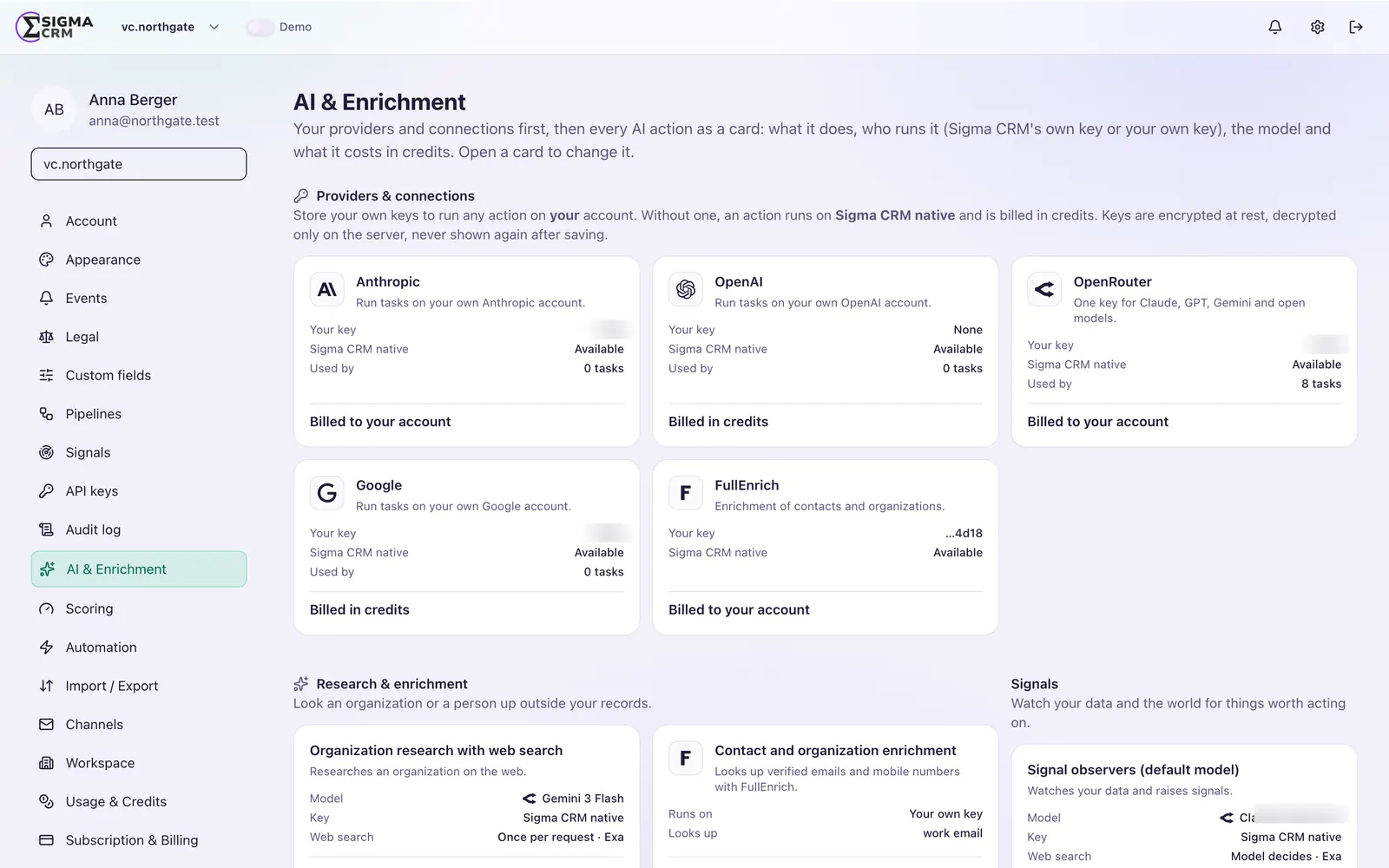
- Several providers built in: Anthropic, OpenAI and Google directly, and many more models through OpenRouter. The provider registry is pluggable, so a new provider is an addition, not a rebuild.
- A model per job: every signal observer and every agent thread can pin its own provider and model. Workspace defaults cover everything else.
- Switching is a setting, not a migration. Sammy has a model picker right under the chat box. Because the tools do not depend on the model, a new model gets every tool the old one had.
- Your own key if you want: your provider bills model usage to you directly, under your contract with them. Keys are stored encrypted on the server and are never shown to MCP clients.
- Your own agent too: Claude Code, the Claude app and any other MCP client can work in the CRM with the same tools.
What does AI in a CRM cost, and how do you keep it affordable?
AI in a CRM is not free. Every deep search, every agent run and every model call costs credits or tokens, and the price grows with the depth of the work. If a CRM seems to include unlimited AI, the cost sits somewhere else, usually in the seat price or in limits you only meet later.
The first question is who sells you the model usage. Either the CRM vendor resells it as its own credits, or you bring your own key and the model provider bills you directly. Most AI CRMs use credits, and they set the price per credit themselves:
| CRM | How AI usage is billed | Price, as published |
|---|---|---|
| Salesforce Agentforce [17] | Flex Credits, per action | $500 per 100,000 credits, 20 credits per action, so about $0.10 an action |
| HubSpot [18] | HubSpot Credits | Customer Agent: 50 credits per resolution. Prospecting Agent: 100 credits per recommended lead |
| Attio [12] | Credits per seat plus a shared workspace pool | 5,000 more workspace credits a month for €70 to €85. Credits per action not documented |
| Lightfield [13] | Workspace credits, pooled for the whole team | Included from Pro. Price per credit not documented |
| Day AI [14] | A flat monthly rate per agent | No usage-based pricing, from $24 per agent a month billed annually |
| folk [15] | Per member, AI features included in the plan | From $24 per member a month billed annually |
| Sigma CRM | Your own key: your provider bills the model directly. Or our credits, if you'd rather not set up a key | On request. With your own key, no markup on model usage |
When usage runs through a vendor's credits, you pay for the model at a price the vendor sets. That price covers the model and whatever the vendor adds on top, and none of the pricing pages above shows the split. Day AI avoids metering altogether with a flat price per agent. With your own key, you see the real model cost, under your own contract with the provider.
That is the part I care most about in Sigma CRM. Bring your own key, and we take no cut of your model usage: your provider bills the tokens to you at their price. In our cloud, each action then costs a small flat credit price that doesn't change with how many tokens the model uses. On-premise, you buy the license once.
The second question is which method does the work. Most classic CRM enrichment works without AI. Data providers look up a work email, a phone number or a company's size in their databases. That is fast and cheap, and for standard fields it is often good enough. An AI deep search reads the company's website, news and registers. It can tell you what an account sells and to whom, even for a company no database knows well. The answer is richer, and it costs more. So there is a real trade-off between quality and price, and it is different for every field and every account.
Nothing forces you to pick one method. The most cost-efficient setup combines them: rules for what is obvious, data providers for contact data, AI research only where it adds something, a small model for routine work and a strong one for research.
This is how we built it in Sigma CRM:
- Rules first, at no cost: a company on a list named Customers, Prospects or Partners gets its type by rule. The AI only judges the rest, in batches.
- Data providers for contact data: work email, personal email and mobile come from a waterfall across data providers. It is pay for success: a search that finds nothing costs nothing.
- AI web search where the databases know little: it reads the company's site, news and registers, fills empty fields with the source page for each value and digs deeper only when the first search finds too little.
- A model per job: a fast, cheap model for tagging and classification, a strong one for research and pipeline reviews.
- Costs you see before you spend: a run is checked against the most it can cost before it starts, and admins can set a monthly credit allowance per person. With your own AI or data provider key, the provider bills you directly and the run costs only its flat credits.
- Some things cost nothing at all: logos come from the company's domain, and imports are free.
Good questions for any vendor: can I bring my own key, and what do I pay you then? What does one enriched company cost, with and without AI, and what do I pay for a search that finds nothing? In a 30-minute Sigma CRM demo we show you the credit price of each step on your own account list.
Why does an AI-native CRM still need a human in the loop?
A CRM holds your relationships. You can't run it completely on autopilot, but you need to use AI in the best way possible.
That is the balance an AI-native CRM has to strike. Agents should take over the work nobody wants to do: research, record keeping, logging signals, preparing the next step. People should stay in charge of everything that reaches a customer or is hard to undo. The Monday task shows the pattern: the agent reads the 20 histories and proposes, a person reviews once and approves, and the history records both.
OWASP calls the failure mode excessive agency: too much functionality, too many permissions or too much autonomy for what the agent needs [19]. The MCP specification adds that there should always be a human in the loop with the ability to deny tool invocations [20]. I'd build that into the CRM itself, not into a prompt, because prompts get edited and forgotten.
| Work | Who does it in Sigma CRM |
|---|---|
| Research an account, log a buying signal with its source | The agent, on its own |
| Propose next steps on stale deals, draft a first message | The agent prepares, a person decides and sends |
| Enroll contacts in a sequence | Only after a person confirms. New sequences start inactive and send nothing |
| Merge duplicates, import lists, change many records at once | Only after a person confirms |
| Contact someone on the do-not-contact list | Nobody. Enrollment skips those addresses |
And because every write is tagged as UI, MCP, agent or observer, a sales lead can see on each record what an agent did and undo what doesn't fit.
What does an AI-native CRM look like in practice?
Here is how we built it in Sigma CRM, test by test. I use it as the example because I can show you the code behind every line, not because it's the only way to do it.
| Test | How Sigma CRM passes it |
|---|---|
| One tool registry | More than 130 tools back the interface, the REST API, the MCP server and Sammy, the built-in agent. A tool added for one caller is there for all of them. |
| Open agent access | Claude Code, the Claude app and any other MCP client connect to the same tools. See Claude CRM. |
| Permissions for agents | Sammy sees exactly what the member who asks sees. An API key belongs to one workspace and reaches shared lists and segments only. |
| Audit | Every write is tagged as UI, MCP, agent or observer, so the record history shows who changed what. |
| No model lock-in | Anthropic, OpenAI and Google built in, more models through OpenRouter. A provider and model per observer and agent thread, a model picker in Sammy and your own key if you want. |
When Claude does the Monday task from outside, it goes through the MCP server. The server checks the key, applies its rights and logs the call, then runs the same tool the interface uses:
What that means for a sales week:
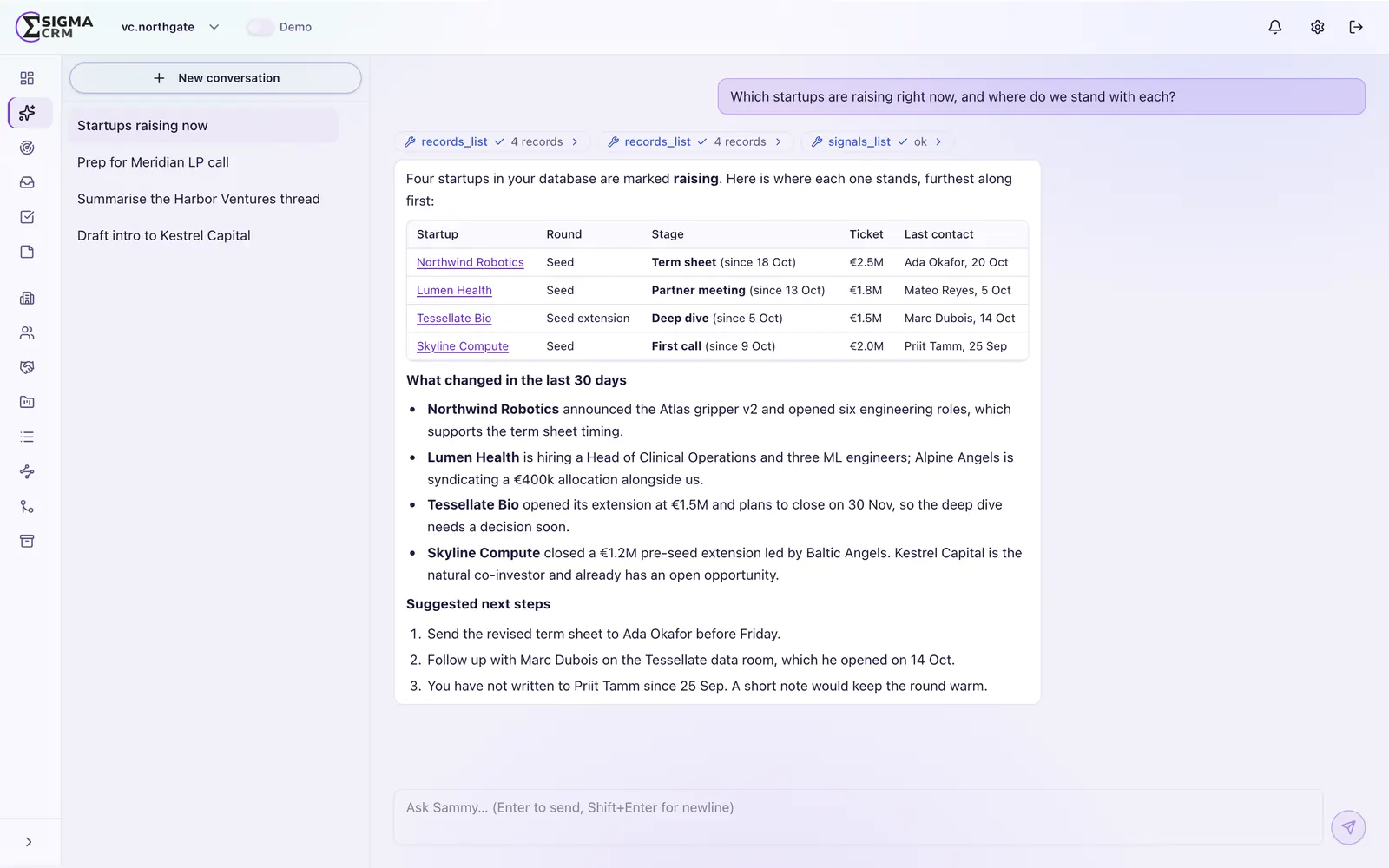
- A signal observer watches your target accounts and logs buying signals with their source on the right organization.
- On Monday, Claude reviews the open pipeline over MCP and lists the deals without a next step.
- A rep asks Sammy which accounts to call first, and Sammy answers from the fit, engagement and signal scores.
- Every change lands in the record history with its source, next to the changes made by people.
More on the agents themselves on the agentic CRM page.
Who needs an AI-native CRM, and who doesn't?
| Situation | AI-native CRM? |
|---|---|
| You want agents to do recurring work: research, signal capture, pipeline reviews | Yes, this is what it is built for |
| Sales context sits in the founder's head and the first reps are joining | Yes, agents keep records current without manual admin |
| Your GTM engineer wants to build agents on CRM data | Yes, you need full API and MCP access |
| Customer data has to stay on your own servers | Yes, if the CRM also runs on-premise |
| You want the best model for each job and to switch when a better one ships | Yes, if the CRM is not tied to one model vendor |
| You only want email drafts and call summaries | Probably not, an add-on can be enough |
Sigma CRM runs on-premise under a perpetual Enterprise license or in our cloud as a subscription, with your own AI key or our credits. The options are on the pricing page. If you recognise your team in the first rows, book a 30-minute demo and we'll look at your case.
How do you check whether a CRM is really AI-native in a demo?
Bring the Monday task, or an even smaller one like moving a deal to Lost and logging why, and ask to see it done three ways: in the interface, by the built-in assistant and by an outside agent over MCP. Then ask to see the record history. If the vendor can only show the first one, it's an add-on.
What happens in a Sigma CRM demo?
It's exactly that test, on your task. No slides, and you talk to me, not to a sales script.
- You book a time. Pick a slot or write a short note with your team size, the CRM you use today and one task you would hand to an agent.
- 30 minutes on your task. We run it in the interface, through Sammy and through Claude over MCP, and look at the record history together.
- Your questions. Which model for which job, what each step costs in credits or on your own key, cloud or on-premise, the perpetual license or the subscription, and how your data gets in.
- You decide. If Sigma CRM fits, you get a quote. If it doesn't, you know what to ask the other vendors.
Frequently asked questions
What is an AI-native CRM?
A CRM in which AI agents can do the work, not just help with it: they use the same tools as people, with their own permissions, and every change they make is recorded.
What does AI-native mean?
Built around AI from the start instead of adding it later. For a CRM, it means every capability is also a tool an agent can use, not only a separate AI feature.
Is an AI CRM the same as an AI-native CRM?
No. AI CRM is a broad label for any CRM with AI features. AI-native means agents can use every capability with the same tools and permissions as people.
What is the difference between an AI-native CRM and a CRM with an AI add-on?
Who does the work. With an add-on, the AI summarises, drafts and suggests, and a person still makes every change. In an AI-native CRM, an agent makes the changes with its own rights, and a person reviews and approves.
Will AI replace the CRM?
No. Agents need a place where customer data, history and rules live, and that is the CRM. What changes is who keeps it up to date: in an AI-native CRM, agents do much of the record keeping and people decide.
What are examples of AI-native CRMs?
Sigma CRM, Attio, Lightfield, Day AI and folk all position themselves as AI CRMs, and HubSpot and Salesforce add agents to their existing CRMs. Sigma CRM is the one you can run on your own servers with your own AI key. Run the five tests above on any of them.
Are Salesforce and HubSpot AI-native CRMs?
Both add AI agents to established CRMs: Salesforce sells Agentforce as an add-on, and HubSpot bills its agents in HubSpot Credits and has an MCP server that can read and write. Whether that counts as AI-native depends on how much of each CRM the agents can reach, so run the five tests on a task of your own.
Which CRM gives full API and MCP access for building agents?
Look for a CRM where the MCP server and the REST API expose the same tools as the interface. In Sigma CRM every capability is a tool, with scoped keys and a tagged history.
Can an AI-native CRM run on autopilot?
It shouldn't. Agents do the research and the record keeping, and people confirm everything that reaches a customer or is hard to undo. In Sigma CRM, enrollments, merges, imports and bulk changes ask for confirmation first.
Do I need an AI-native CRM?
If you only want summaries and drafts, probably not. If you want agents to do recurring work like pipeline reviews or signal capture, it matters a lot.
Can an AI-native CRM run on-premise?
Sigma CRM can. It runs on-premise on your own servers or in our cloud, with the same MCP server and agents.
Which AI models does Sigma CRM use?
The ones you choose. Anthropic, OpenAI and Google are built in, and many more models are available through OpenRouter. Claude also connects natively over MCP.
Can we switch AI models later?
Yes, at any time. Each observer and agent thread has its own provider and model, Sammy has a model picker, and the tools stay the same when the model changes. There is no migration.
Do AI CRMs charge extra for AI usage?
Most do, through credits: Salesforce Flex Credits, HubSpot Credits, and credit pools at Attio and Lightfield. Day AI charges a flat price per agent. In Sigma CRM you can bring your own key, so your provider bills the model directly and we add no markup.
Is AI enrichment better than a data provider?
Not always. Data providers are faster and cheaper for contact data and standard fields. AI web search is better for accounts the databases know little about and for questions like what a company sells. The most cost-efficient setup combines both, which is what Sigma CRM does.
What does AI enrichment cost in Sigma CRM?
It costs credits. Rules and imports cost nothing, contact data from data providers is billed only when something is found, and AI web search is one charge per company. With your own keys, the provider bills you directly and the run costs only its flat credits. Prices are on request, see pricing.
What does Sigma CRM cost?
There is a cloud subscription, with your own AI key or our credits, and a perpetual Enterprise license for on-premise. Prices are on request, see pricing.
References
- Salesforce, "Salesforce Introduces Salesforce Einstein: Artificial Intelligence for Everyone", Salesforce, 19 Sep 2016. https://www.salesforce.com/news/press-releases/2016/09/19/salesforce-introduces-salesforce-einstein-artificial-intelligence-for-everyone/
- Salesforce, "Salesforce Announces Einstein GPT, the World's First Generative AI for CRM", Salesforce, 7 Mar 2023. https://www.salesforce.com/news/press-releases/2023/03/07/einstein-generative-ai/
- destinationCRM, "HubSpot Launches ChatSpot.ai and Content Assistant", destinationCRM, 6 Mar 2023. https://www.destinationcrm.com/Articles/CRM-News/CRM-Across-the-Wire/HubSpot-Launches-ChatSpot.ai-and-Content-Assistant-157466.aspx
- Salesforce, "Salesforce Unveils Agentforce: What AI Was Meant to Be", Salesforce, 12 Sep 2024. https://www.salesforce.com/news/press-releases/2024/09/12/agentforce-announcement/
- Anthropic, "Introducing the Model Context Protocol", Anthropic, 25 Nov 2024. https://www.anthropic.com/news/model-context-protocol
- Model Context Protocol, "MCP joins the Agentic AI Foundation", Model Context Protocol Blog, 9 Dec 2025. https://blog.modelcontextprotocol.io/posts/2025-12-09-mcp-joins-agentic-ai-foundation/
- HubSpot, "Remote HubSpot MCP server is now generally available", HubSpot Developer Changelog, 13 Apr 2026. https://developers.hubspot.com/changelog/remote-hubspot-mcp-server-is-now-generally-available
- Gartner, "Gartner Predicts 40% of Enterprise Apps Will Feature Task-Specific AI Agents by 2026, Up from Less Than 5% in 2025", Gartner, 26 Aug 2025. https://www.gartner.com/en/newsroom/press-releases/2025-08-26-gartner-predicts-40-percent-of-enterprise-apps-will-feature-task-specific-ai-agents-by-2026-up-from-less-than-5-percent-in-2025
- Gartner, "Gartner Predicts Over 40% of Agentic AI Projects Will Be Canceled by End of 2027", Gartner, 25 Jun 2025. https://www.gartner.com/en/newsroom/press-releases/2025-06-25-gartner-predicts-over-40-percent-of-agentic-ai-projects-will-be-canceled-by-end-of-2027
- Salesforce, "Salesforce Announces State of Sales Report for 2026", Salesforce, 2026. https://www.salesforce.com/news/stories/state-of-sales-report-announcement-2026/
- Anthropic, "Building effective agents", Anthropic Engineering, 19 Dec 2024. https://www.anthropic.com/engineering/building-effective-agents
- Attio, "MCP overview", "Chat with Ask Attio", "Attio AI policy" and "Pricing", checked 7 Nov 2026. https://docs.attio.com/mcp/overview, https://attio.com/help/reference/attio-ai/ask-attio/chat-with-ask-attio, https://attio.com/help/reference/attio-ai/attio-ai-policy, https://attio.com/pricing
- Lightfield, "MCP quickstart", "Choose a model" and "Pricing", checked 7 Nov 2026. https://docs.lightfield.app/getting-started/mcp-quickstart/, https://docs.lightfield.app/help/chat/choose-a-model/index.md, https://lightfield.com/pricing
- Day AI, "MCP" and "Pricing", checked 7 Nov 2026. https://day.ai/mcp, https://day.ai/pricing
- folk, "MCP overview", "Security and privacy" and "Pricing", checked 7 Nov 2026. https://developer.folk.app/mcp/overview, https://help.folk.app/en/articles/5007534-security-privacy, https://www.folk.app/pricing
- HubSpot, "Remote MCP server", "HubSpot AI trust", "Custom LLM workflow actions", "Cloud infrastructure and data hosting FAQ" and "Sales Hub pricing", checked 7 Nov 2026. https://developers.hubspot.com/docs/build-with-ai/remote-mcp-server, https://trust.hubspot.com/ai, https://knowledge.hubspot.com/integrations/create-and-use-custom-llm-workflow-actions, https://knowledge.hubspot.com/account-security/hubspot-cloud-infrastructure-and-data-hosting-frequently-asked-questions, https://www.hubspot.com/pricing/sales/enterprise
- Salesforce, "Agentforce pricing", checked 7 Nov 2026. https://www.salesforce.com/agentforce/pricing/
- HubSpot, "HubSpot's Customer Agent and Prospecting Agent: Now you pay when the task is complete", HubSpot, checked 7 Nov 2026. https://www.hubspot.com/company-news/hubspots-customer-agent-and-prospecting-agent-now-you-pay-when-the-task-is-complete
- OWASP GenAI Security Project, "LLM06:2025 Excessive Agency", OWASP, 2025. https://genai.owasp.org/llmrisk/llm062025-excessive-agency/
- Model Context Protocol, "Specification 2025-06-18: Tools", modelcontextprotocol.io, 2025. https://modelcontextprotocol.io/specification/2025-06-18/server/tools
About this article: I work with a set of AI agents that research sources and turn my notes and the Sigma CRM documentation into a draft. The product facts come from our own documentation and code. The opinions are mine.
Sigma CRM is built for teams that want agents doing real CRM work, without being tied to one AI model or paying a markup on it. Book a 30-minute demo with me, bring one real task from your sales week, and we'll run it in the interface, through Sammy and through Claude.